
HSA/FSA Eligible
iOS/Android Available
As Seen On ABC's Shark Tank
Free Shipping On Orders Over $75
HSA/FSA Eligible
iOS/Android Available
As Seen On ABC's Shark Tank
Free Shipping On Orders Over $75


4.8/5 3,000+ Reviews
One Tap To Remove All Distractions
As seen on ABC's Shark Tank, Bloom is a metal keycard that locks your distractions.
Buy Now
HSA/FSA Eligible
4.8/5 3,000+ Reviews
One Tap To Remove All Distractions
As seen on ABC's Shark Tank, Bloom is a metal keycard that locks your distractions.
Buy Now
HSA/FSA Eligible

INTENTIONAL FOCUS
How Does Bloom Work?
1
Choose your distractions
Pick the apps & websites that steal your time (Instagram, TikTok, Facebook, YouTube, etc.).
2
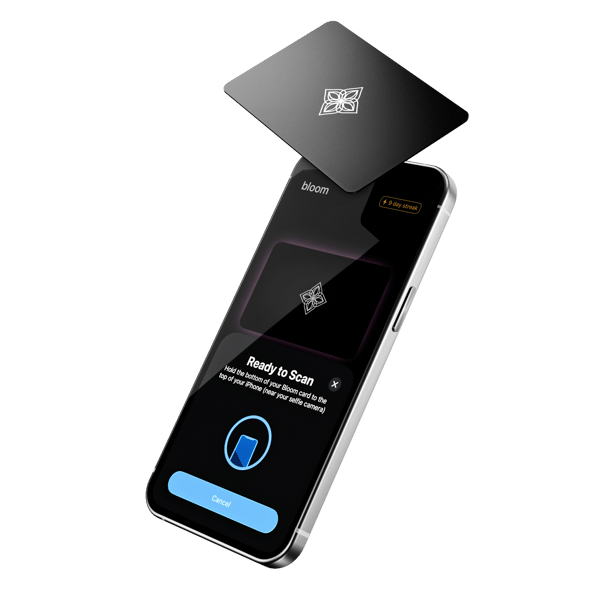
Tap your bloom card
Physically tap your Bloom card to your phone (or set a schedule) to block those apps.
3
Live distraction free
Enjoy uninterrupted focus. Your distractions stay blocked until you tap your card to unlock them.
Buy Now
As seen on ABC's Shark Tank
REAL FRICTION
What Makes Bloom Different?

vs

REAL FRICTION
What Makes Bloom Different?
Most screen time apps can be bypassed by pressing “ignore” or “extend.” Bloom is different. It lets you leave the “key” to your distractions behind, adding real friction so you stay focused.
Take Control Of Your Attention
The Bloom Card
3,000+ Reviews
Buy Now
As seen on ABC's Shark Tank

Guaranteed Focus, Or
Your Money Back
Bloom comes with a 30-day money-back guarantee. If you don’t feel a real improvement in your focus and phone habits within 30 days, we’ll refund your full purchase. No questions asked.
What Our Customers Are Saying
Stories from customers who reclaimed their attention and rebuilt daily discipline.
DATA BACKED
Real Results From Real Customers
91%+
Sharper Focus
100%
75%
50%
25%
0%
88%+
Less Distractions
100%
75%
50%
25%
0%
After 30 days
Lower Screen Time
92 %
Healthier Habits
88 %
More Mindful
97 %
*Results from a survey of 437 real customers.
Updated as of March, 2026.
*Results from a survey of 405 real customers. Updated as of April 2026.
See Full Results
BENEFITS
One Card, Endless Ways To Use It


Deep Sleep
For improved sleep, leave Bloom out of your bedroom before bed. By removing the ability to unlock apps in the bedroom, you reduce blue light exposure and cortisol spikes for better sleep quality.
FEATURES
Take Back Your Time
Craft your ideal screen time environment with features designed to build long lasting habits.
Emergency Exits
Unblock all apps without your card up to three times.
Breaks
Customize your focus with 5 minute breaks for some moderation
Schedules
Schedule your focus periods to start and stop automatically.
Website Blocking
Block distracting websites as well as apps.
Strict Mode
Prevents app deletion during focus sessions to increase restriction.
No Charging
Bloom doesn't have a battery and doesn't require charging.
Special Blocking
Block adult content, in-app purchases, and app installs (iOS only).
Leaderboard
Compete with friends and others for the highest focus streak.
Child Mode
Lock your child's apps, and only the bloom card can unlock them.
OUR STORY
As Seen On Shark Tank
Bloom started in a UCLA dorm room — and somehow made it all the way to Shark Tank.
We were fed up with how much time our phones were stealing. Screen Time and productivity apps didn’t help because we always found a way around them.
Bloom wasn’t meant to be a company. It was just a fix for ourselves and our friends. But when we saw how well it worked, we turned down our internships and drained our savings to build it for real.
Now, Bloom is helping tens of thousands of people reclaim their time.
And we’re just getting started.

Danny Chmaytelli
Co-Founder @ Bloom

Giancarlo Novelli
Co-Founder @ Bloom
OUR STORY
As Seen On Shark Tank
Bloom started in a UCLA dorm room — and somehow made it all the way to Shark Tank.
We were fed up with how much time our phones were stealing. We’d pick them up “for a minute” and suddenly an hour was gone. Screen Time and productivity apps didn’t help because we always found a way around them.
Bloom wasn’t meant to be a company. It was just a fix for ourselves and our friends. But when we saw how well it worked, we turned down our internships and drained our savings to build it for real.
Now, Bloom is helping tens of thousands of people reclaim their time.
And we’re just getting started.
Danny Chmaytelli
Co-Founder @ Bloom
Giancarlo Novelli
Co-Founder @ Bloom

BULK ORDER
Bloom For Business

BULK ORDER
Bloom for Business
Order Bloom keycards engraved with your logo.
Give your employees and clients a gift that promotes digital wellbeing and work-life balance.
Got Questions? We’ve Got Answers.
Everything you need to know about Bloom, the card, setup, compatibility, shipping, and how it fits into daily life.
What if I lose my card?
We get it—mistakes happen! You get three emergency exits to instantly unblock all of your apps, and you get an additional one every month.
Why use a physical card?
We found that creating physical distance from our devices was the best way to avoid distractions. Software solutions, like Apple Screen Time, helped but always had a "skip" option, making it easy to override limits. With a physical device, if it’s not close by, you don’t have the “key” to your distractions, allowing you to stay focused.
Can I block apps without my card?
Simply click the "Activate Focus" button to activate a focus session without your card.
Is Bloom available on Android?
Yes!
Is the app free?
Yes! No hidden fees or subscriptions. Your purchase of a Bloom card includes lifetime access to all the features of our app.
Can't I just delete Bloom?
By default, deleting Bloom will unblock all of your apps. However, you have the option to toggle "strict mode" in settings, which prevents all apps from being deleted while in a focus session.
Still Have Questions?
Feel free to get in contact with us!
Contact Us

